Bring your library.
Link Plex with a code, or connect to your Jellyfin or Emby server. Choose the movie and TV libraries you have access to.

Turn your Plex, Jellyfin or Emby movies and shows into channels.
Drop in, flip around, and find something good. A familiar guide, your own library, and a little old-school TV magic.
Free to watch. No SurfRewind subscription.
Available on Fire TV, Google TV, Android TV and Windows beta. Jellyfin & Emby integrations are still in beta. Get connected.
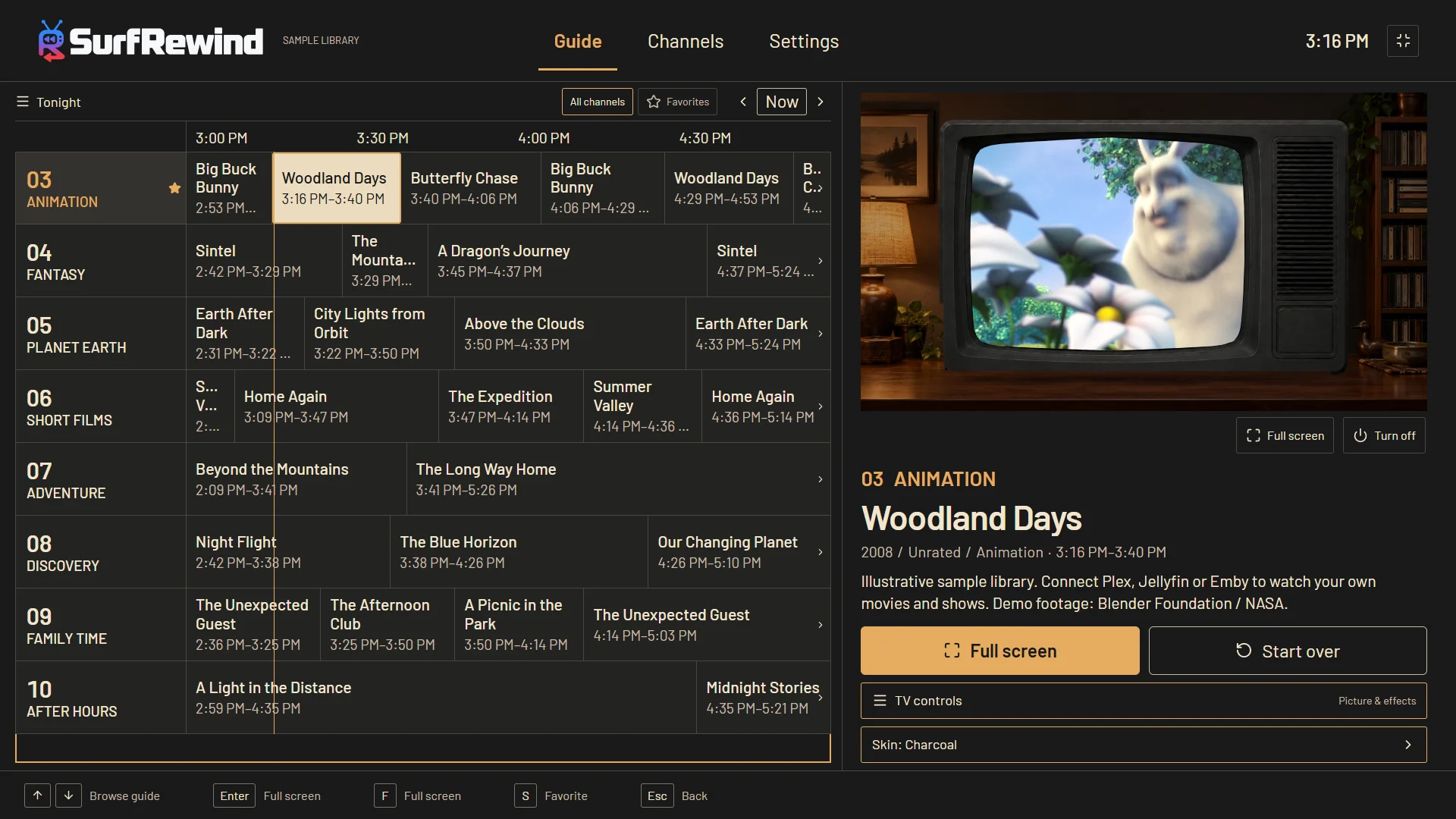
Actual app interface with a sample library. All four looks come with the app. Sample programming is not included. Sample footage credits.
Your library stays yours. The Windows beta doesn’t upload your library or viewing history to us. Privacy details.
Channel surfing, the guide, retro cabinets and screen effects. Take a quick tour of the real Windows app—with a little Saturday-morning energy.
YouTube loads only when you choose to watch. Watch on YouTube
Recorded using a personal media library. Movies and shows are not included with SurfRewind. Extra cosmetic themes are optional purchases; the core app is free.
The separate free-theme guide previews use silent, resized and cropped excerpts from Big Buck Bunny and the Sintel trailer, © Blender Foundation, under CC BY 3.0; and ISS Timelapse: West Coast of the Americas, Earth Science and Remote Sensing Unit, NASA Johnson Space Center. No endorsement is implied. Sample programming is not included with SurfRewind.
Go clean and full screen. Add just a little analog character. Or bring the whole old TV back. You choose how far to rewind.
Watch full screen in the video’s original proportions. Keep the regular guide for channel surfing, and turn the TV frame on or off whenever you like.
Scanlines, light snow, glass and cable quirks work over the full-screen picture too. Mix layers, adjust their strength, or switch them off.
Original proportions preserve the whole picture; some movies naturally have black bars. Optional 4:3 Fill crops widescreen video inside a TV frame.
Link Plex with a code, or connect to your Jellyfin or Emby server. Choose the movie and TV libraries you have access to.
SurfRewind builds channels from your library by itself: your biggest shows in episode order, collections, genre mixes and decades. Keep what you like, then join what’s on right now.
Keep the picture clean or try a preset. Change the frame, colors and effects with simple controls, then save a look you love.
SurfRewind is a player for media you already have permission to access. It doesn’t include movies, shows, live broadcast channels or commercial clips.
Keep it simple—or make a night of it. Optional themes bring candlelight, drifting fog, festive rooms and flowing lava lamps.
Free Silver cabinet · optional extra backgrounds
Keep your favorite cabinet and change the room around it. Here, the Silver set moves from a wood-paneled basement to a snowy cabin and a two-lamp lounge. Set the brightness and motion to suit you.
Actual app effects. Original display artwork. Optional extras, separate from the permanent free theme collection.
Explore every cabinet, room and guide palette
Four classic themes are included free. Optional Windows themes cost US 99¢ each, paid once, to support development. Buy only the looks you want; the core app stays fully functional and free. Browse extra themes.
This gallery shows the broader collection. The current Google Play release has the four free classics; the newest theme collections are in Windows first. Compare platform availability.
Keep a favorite cabinet and try another available background—or turn the room off. Choose an in-room or full-height set, then make it yours.
44 cabinet looks, from the family den to a distant space station. Play with a cabinet, background and size below. Four classic themes are free. Extra themes are US $0.99 each; five-theme collections are US $2.99 in the Windows store.
Silent SurfRewind effects sample · Room animation not shown
Included free
Warm cream, amber, and the familiar tube TV.
A little more room around the TV. You can mix this cabinet with other backgrounds you own.
Try everything here without signing in. This website preview doesn’t unlock paid themes or change your app settings. All samples use SurfRewind’s own artwork; guide strips show palette samples, not a full guide. Explore the animated recordings above or use Theme Studio in the Windows app. TV-store availability and purchases are separate.
Get it on Google Play for your TV, or try the Windows beta. Bring your own media server; no subscription or payment details required by SurfRewind.
Windows 11 · 64-bit Intel/AMD · monitor or HDMI-connected TV
0.9.7-beta.22 · signed installer · 183 MB
New channel discovery: browse genres, eras, TV formats and seasonal mixes, preview matching titles, and refresh without losing your lineup. Channels are always free.
New and free: create your own TV look. Choose a classic or widescreen tube, customize the cabinet and guide, add a background photo, and save it on this PC. The picture fits the tube automatically.
Installation & setup guidesAvailable on the Amazon Appstore for Fire TV Sticks and Cubes running Fire OS.
Free: the guide, channels built from your library, programming like a station, number-key tuning and four classic cabinets. Fire TV devices running Vega OS do not run Android apps.
Available on Google Play for compatible TVs, including NVIDIA Shield and RayNeo Pocket TV.
Free playback, the guide and four classic themes. This release is for TVs, not Android phones or tablets. Build 29 is now published: channels built from your library, programming like a station, number-key tuning and Back to the top menu in one press. The full theme collection is not available on TV yet.
Buying themes? Windows checkout is available. Google TV / Android TV purchase verification is still being completed; please don’t purchase extras on TV yet. Windows, Google Play and Amazon purchases are separate—not a cross-platform pass.
Latest Windows update: optional last-channel startup, Previous channel, a sleep timer, audio/subtitle defaults and channel ordering. Screen light now follows nearby picture colors more quickly; turn it on and adjust its strength in Settings. This is beta software, not a finished release. Codec support depends on your PC and media server; 4K/HDR and every media format are not certified. Updates appear in Settings, with automatic checks you can switch off. You choose when to download and install; updates never interrupt playback automatically.
Tell us your device, app version and what happened. Please leave out passwords, tokens and payment details.
No media is included. Keep your media server available while you watch.
No. SurfRewind builds scheduled channels from movies and shows on a Plex, Jellyfin or Emby server you have permission to access. Keep that server online while watching. You don’t need all three services—choose the one you use. Jellyfin and Emby integrations are in beta.
Core playback, channel surfing, the guide and four classic themes are free—not a trial. No SurfRewind subscription is needed. Optional Windows themes cost US $0.99 each, or US $2.99 for a five-theme collection, paid once. You never need to buy a theme to watch.
Get the TV app from the Amazon Appstore on Fire TV, or through Google Play on a compatible Google TV or Android TV device, including NVIDIA Shield and RayNeo Pocket TV. The Windows beta is for 64-bit Intel/AMD Windows 11 PCs. Apple TV, Mac, Android phones and tablets do not have a public release.
Windows purchases can be restored on another Windows PC using the same SurfRewind email account. Google Play and Amazon purchases are separate from Windows purchases. Don’t buy a Windows theme expecting it to unlock on a TV-store build. TV purchase verification is still in progress.
Install from Google Play or download the Windows beta, choose Plex, Jellyfin or Emby, pick your libraries and start your channels. It takes a few minutes. Step-by-step setup, or browse all help topics.
Install guides, commercials, purchases, updates and troubleshooting